Local typographic QA · Adobe InDesign CC 2020+

Typography control. In your hands.

Avellio gives InDesign documents a deterministic QA layer: style override detection, 30+ typographic checks, 15 locale profiles, layout debt audit, and exportable reports.

No cloud upload. No probabilistic guessing. The same file produces the same findings every time — directly inside InDesign, before the final PDF leaves.

30+Typography checks
5Inspection tiers
15Locale profiles
0Document uploads
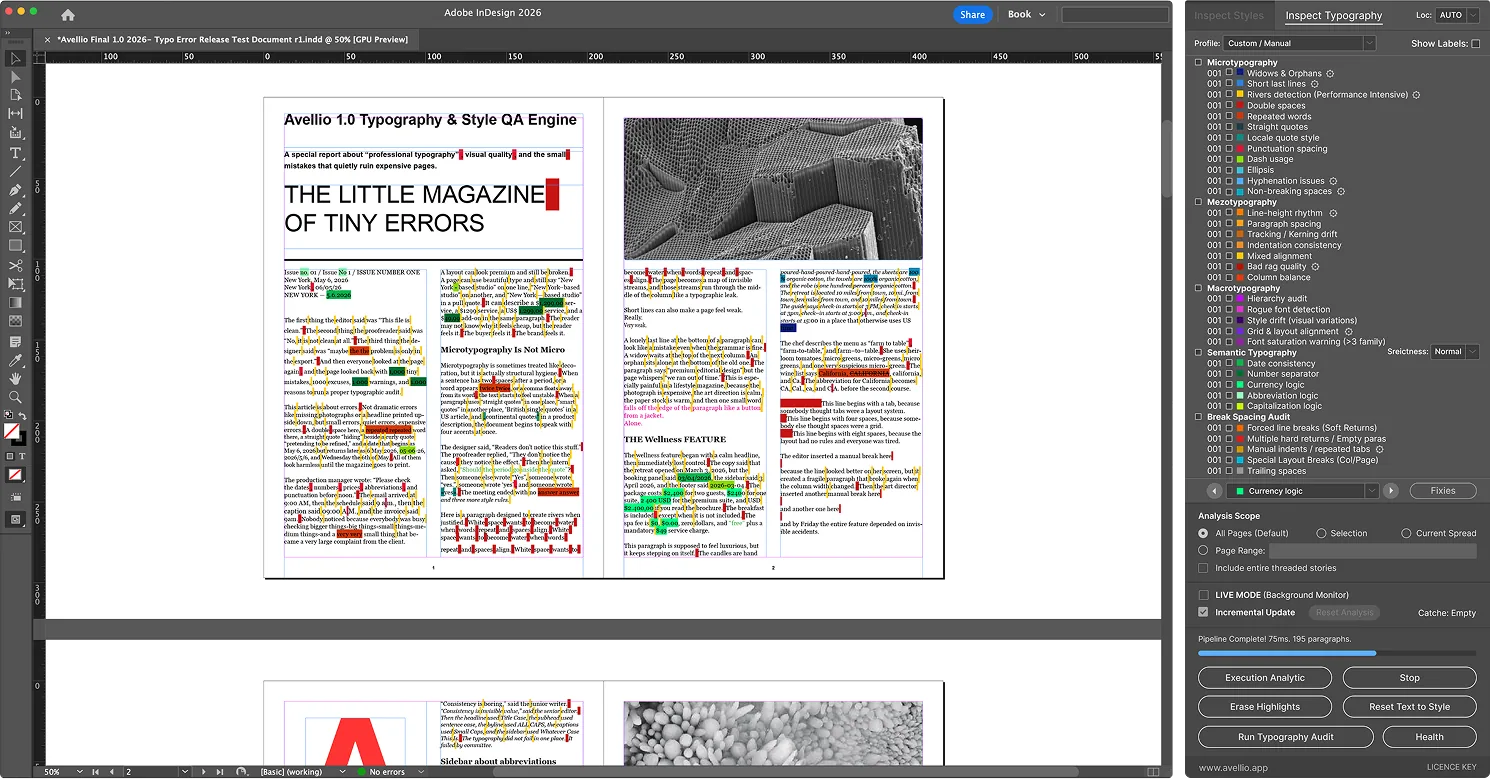
Annual_Report_2026.indd · Avellio Diagnostic Pass
scanning
Widows & Orphans rendered geometry Rivers of White visual chain detection Style Fingerprints no override hides Locale Rules quotes · NBSP · dates Layout Debt soft returns · manual indents Reports CSV audit trail Widows & Orphans rendered geometry Rivers of White visual chain detection Style Fingerprints no override hides Locale Rules quotes · NBSP · dates Layout Debt soft returns · manual indents Reports CSV audit trail
Product system

A QA engine for documents that cannot afford drift.

Avellio is not another preflight checklist. It is a diagnostic layer for the invisible typography problems that accumulate through edits, handoffs, imports, and deadline pressure.

Inspect Styles

Style system intelligence.

Map every paragraph and character against its defined style. Detect overrides, rogue fonts, near-duplicate styles, language drift, and structural inconsistency before production.

Override Detection

Not all overrides are equal.

Critical overrides cost −10 pts, Geometric overrides −2 pts, Styling overrides −1 pt. The Style Integrity Score gives every file a repeatable 0–100 QA benchmark.

Fingerprint

No override hides.

Fingerprints actual font, size, colour, tracking, and scale of every character run — even when the Styles panel says the range is clean.

Live Mode

Scan as you edit.

Live Mode re-scans changed stories instead of the full document, keeping highlights fresh without blocking the layout workflow.

Reports

Explainable audit trail.

Export Override and Typography reports to CSV. Every finding is documented, filterable, and defensible during prepress handoff.

Inspection tiers

Five layers of typography control.

Every Avellio finding maps to a clear severity and design layer. You see whether the problem is micro detail, paragraph rhythm, style hierarchy, semantic logic, or layout debt.

Tier 01

Micro typography

  • Widows & orphans
  • Rivers of white
  • Hyphenation ladders
  • Double spaces
  • Repeated words
  • Smart quotes
Tier 02

Mezo typography

  • Bad rag quality
  • Tracking drift
  • Paragraph spacing
  • Mixed alignment
  • Column rhythm
Tier 03

Macro hierarchy

  • Rogue fonts
  • Style drift
  • Heading order
  • Hierarchy violations
  • Missing captions
Tier 04

Semantic typography

  • Date formats
  • Currency logic
  • Number separators
  • Abbreviations
  • Locale rules
Tier 05

Layout debt

  • Soft returns
  • Empty paragraphs
  • Manual indents
  • Trailing spaces
  • Hidden cleanup debt
Locale intelligence

Typography rules differ by language.

Avellio reads InDesign language settings and validates quotation marks, non-breaking spaces, date formats, number separators, currency conventions, and abbreviations per locale.

AUTO

Auto-detect

Reads applied language per paragraph. Mixed-language documents can be validated without manually switching profiles.

EN · GB

English

US and GB quote conventions, dash behavior, and abbreviation differences.

DE · CH · AT

German

German quote styles, Swiss thousands separators, and regional punctuation logic.

FR

French

Guillemets, narrow non-breaking spaces, and high-punctuation spacing.

CZ · SK

Czech / Slovak

Academic title NBSP, one-letter prepositions, and Czech quote conventions.

PL

Polish

Preposition spacing, abbreviation lists, and currency suffix validation.

NL

Dutch

IJ digraph capitalisation and locale-specific euro placement.

IT · SE · HU · BR · PT · SP

More profiles

Month names, quotation patterns, date formatting, and regional currency rules.

Positioning

Different job than InDesign AI.

AI helps generate or transform content. Avellio verifies the technical quality of a finished InDesign document. Those jobs do not overlap.

Capability
InDesign AI
Avellio
Generate image fills or rewrite copy
Creative generation inside layout frames
Detect style overrides by severity
Critical, Geometric, Styling
Measure widows, rivers, and rag quality
Rendered page geometry, not character guessing
Score style integrity 0–100
Repeatable QA benchmark per document
Validate locale-specific typography
Quotes, NBSP, dates, currencies
Export explainable QA reports
Override and Typography CSV logs
Workflow

Four steps from messy file to clean handoff.

No plugin manager. No cloud workspace. Two files in the Scripts Panel folder, one license key, then the palette opens inside InDesign.

01

Place files.

Copy Loader.jsx and Engine.jsxbin into InDesign's Scripts Panel folder.

02

Activate.

Enter your license key once. The Avellio palette opens as a floating QA panel.

03

Scan.

Choose Inspect Styles or Inspect Typography, set page scope and locale, then execute.

04

Fix & export.

Review highlights, fix what matters, re-run, erase highlights, and export CSV reports.

Pricing

Simple licensing for real production work.

Solo Designer · 1 license
$39.99
/year · billed annually
  • 1 named user · commercial use
  • macOS & Windows · CC 2020+
  • Inspect Styles — all modes
  • Inspect Typography — all tiers
  • 15 locale profiles
  • CSV reports included
Get Solo Annual
Team · 10 licenses
$249.99
/year · $25 per seat
  • 10 named users · commercial use
  • Agency and publisher workflow
  • All Avellio v1.x features
  • Override and Typography reports
  • macOS & Windows
  • Custom licensing available
Contact for Team Annual
Trust & compatibility

Questions before you buy.

Is Avellio JSX or UXP?

Avellio v1 uses JSX / ExtendScript because InDesign's mature scripting model gives access to composed text geometry, style overrides, and document layout. UXP support is better treated as a future major-version track.

Does Avellio automatically change my document?

No. Avellio is review-first: it marks suspicious areas and reports findings. You decide what to fix. Use a saved copy for critical production files.

Does it upload documents anywhere?

No. Avellio runs inside InDesign as a local script. License verification is separate and should not transmit client document content.

Which InDesign versions are supported?

Avellio v1.0 targets Adobe InDesign CC 2020 and later on macOS and Windows. Keep this claim updated as new CC versions are tested.

What should I run first?

Start with Style Integrity Audit on a real client file after several rounds of edits. That is where override accumulation and layout debt are easiest to see.

Run the final QA pass before the PDF leaves.

Cleaner files, fewer hidden overrides, better handoff confidence. Built for designers, DTP technicians, typographers, and prepress teams who already know that manual checking does not scale.